
www.schorsch.com
Since there is no useful way to name the field definition blocks in Autocad/Intellicad, we need to assign a name to each definition when we import it. This can happen in two ways:
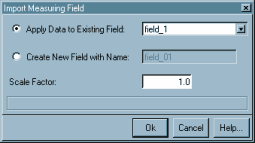
Apply Data to Existing Field
If there are any named field definitions around in the
project, then you can select one of them from the drop down
list. The positioning data of the imported field will then
be assigned to this field, while the subdivision setup
of the grid will remain unchanged.
If there are no fields stored in the project yet, then this option will be inactive.
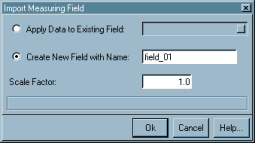
Create New Field with Name:
You can type a new name into the entry field, and the
data of the selected DFGRID block will be used to create
a new field definition. If the name is empty or equal to
one of the existing fields, then the background of the
entry field takes a red color and the Ok button will
refuse to store the field.
Scale Factor:
The imported field definition
will be scaled according to this factor.
The value set here will be used as the default for future
imports of views, measuring fields, and geometry data.
Note: It is highly recommended to scale all data imported into Rayfront to meter units, in order to avoid consistency problems with imported luminaires and the Raydirect plug-in.
Ok - Accept the new or updated field as the active field and close the dialog.
If you have previously created a new field, or edited an existing one, which is not saved yet, then you will get prompted to either save or discard it before the new one is activated.
Cancel - Discard the new field and close the dialog.
Help... - Display this information.
| Up: |
User Manual Overview The Simulation Control Center Simulation Setup | |
|
Previous: |
Editing a Measuring Field | |
|
Next: |
Run a Simulation |