
www.schorsch.com
The view import facility prompts you to select one of
the views that have previously been stored with a name
in the Autocad/Intellicad drawing, or the current view.
(This functionality is only available, when Rayfront is
running as an Autocad/Intellicad extension.)
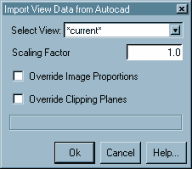
Select View:
The drop down list will offer all model space views
currently known to Autocad/Intellicad for selection. The view
currently active in the graphics window is listed as "*current*"
(if in modelspace) and will be converted as "current".
Scaling Factor:
The view point (and the view size, for parallel views)
will be scaled according to this factor.
The value set here will be used as the default for future
imports of views, measuring fields, and geometry data.
Note: It is highly recommended to scale all data imported into Rayfront to meter units, in order to avoid consistency problems with imported luminaires and the Raydirect plug-in.
Override Image Proportions
This check box is active when the selected view
already exists in the project.
If selected, then the current view size and proportions
(determined by the size of the graphics window) will
override the image size of the stored view. Otherwise,
the size of the view in the project is left unchanged.
Override Clipping Planes
This check box is active when the selected view
already exists in the project.
If selected, then the clipping planes returned from
Autocad/Intellicad will override the clipping planes of the stored
view. Otherwise, the clipping planes of the view in the project are
left unchanged.
Ok - Accept the new or updated view as the active view and close the dialog.
If you have previously created a new view, or edited an existing one, which is not saved yet, then you will get prompted to either save or discard it before the new one is activated.
Cancel - Discard the new view and close the dialog.
Help... - Display this information.
| Up: |
User Manual Overview The Simulation Control Center Simulation Setup | |
|
Previous: |
Editing a View | |
|
Next: |
Editing a Measuring Field |